
When a company switches from the ALTUS VARIO ERP to the minifaktury.cz online invoicing portal, it doesn't want to start with an empty one. The VARIO → minifaktury.cz utility transfers issued invoices for any period — even every year going back — so from day one the portal shows turnover by year, your customers, and what was invoiced to whom.
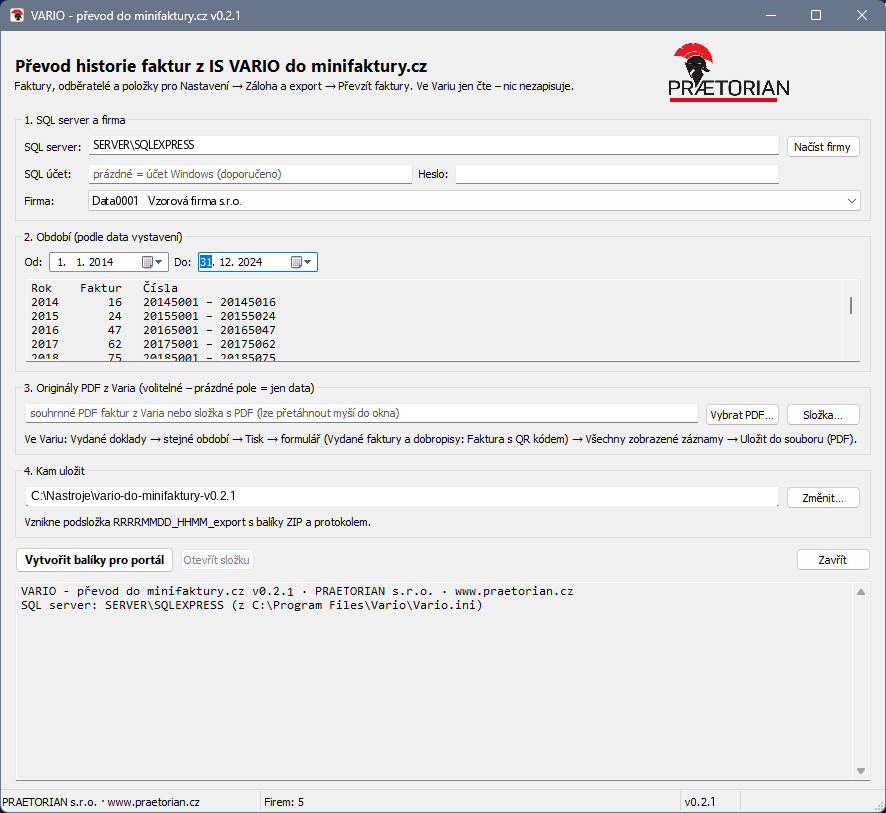
The utility window while running (click to enlarge)
What gets migrated
- Issued invoices and credit notes with line items, VAT and all dates — issue date, taxable supply date, due date and payment date. Invoice numbers stay exactly as they were in VARIO.
- Customers — as a bonus, they're created straight into the portal's address book from the invoices, complete with address, Company ID and VAT ID. They're matched by Company ID, so nothing gets duplicated.
- Line items — anything invoiced before is offered as an autocomplete suggestion when writing a new invoice.
- Original PDFs (optional) — the utility itself splits a combined PDF printed from VARIO into a separate PDF for each invoice. Multi-page invoices stay together, and the files are compressed (roughly 90 kB per invoice).
Safe, and read-only
The utility connects to the VARIO database read-only (SELECT statements only) — it changes nothing and writes nothing in VARIO, which can keep running normally during the migration. The result is ZIP files that get uploaded to the portal. Before importing, the portal shows a check (counts by year, a total to compare against VARIO, new customers), and the whole import can be rolled back at any time.
How it works
- Run the utility on the computer with VARIO installed — it finds the SQL server on its own from VARIO's settings and offers the companies.
- Pick a company and a period; the utility shows how many invoices there are for each year.
- Optionally add a combined PDF from VARIO (Print → All displayed records → Save to PDF file).
- Click Create packages for the portal — a folder with the packages and a log appears next to the utility.
- Upload the packages in the portal: Settings → Backup and export → Import invoices.
Proven in production: we migrated PRAETORIAN s.r.o.'s own history — over 1 700 invoices across 13 years (2014–2026).
More about migrating to minifaktury.cz →
- Version
- 0.2.0
- System
- Windows 10/11 (64-bit), Windows Server 2016+
- Installation
- none — a single exe, run from the folder
- Connection
- VARIO's MS SQL Server (including SQL Express without TCP/IP), read-only
- Output
- ZIP packages up to 7 MB + protokol.txt log