
Microsoft has ended support for the Remote Desktop app from the Microsoft Store, and the new Windows App does not suit everyone. RDP Manager replaces it. It keeps groups, computers and accounts tidy in one place and connects through the standard mstsc.exe, which Microsoft continues to support. Nothing to install, just run a single file.
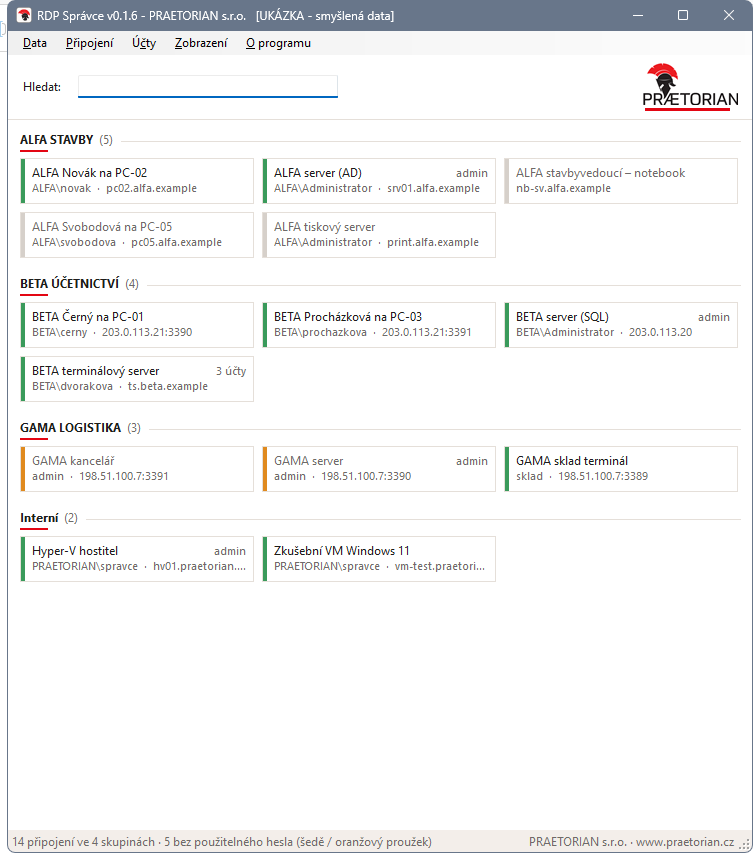
Tiles view: the coloured stripe shows whether a password is stored for the connection (sample data)
What it does
- Groups and computers just like in Remote Desktop, instant search, List or Tiles view.
- Several accounts per computer: the default one on double-click, others via Connect as.
- At a glance you can see where a connection won't ask for a password: a green stripe means a password is stored, orange means a different user is stored for the same address, grey means mstsc will ask.
- Imports groups, computers and accounts from the old Remote Desktop app, either from an
.rdbexport or directly from its data. - Bulk entry of missing passwords for dozens of accounts at once.
- Backup and restore to a single file, with passwords optionally encrypted (AES-256) by a backup password. It can be restored on another computer.
- Every change automatically keeps the previous state (last 30 versions).
How passwords work
Passwords stay in Windows Credential Manager, and none are stored in the program's files. Where Windows already has a saved password, mstsc uses it on its own and the program stays out of the way.
On terminal servers and behind NAT, where several users or computers share one address, Windows can keep only one password per address. RDP Manager therefore inserts the chosen account's password only for the moment of sign-in and removes it afterwards. Everyone ends up in the right profile.
Deployment
- Unzip and run
RDP-Spravce.exe. Windows 10/11 is enough (.NET Framework 4.5+ is built in). - On first start it offers to import data from the old Remote Desktop app.
- Missing passwords are filled in in bulk from the Data menu.
- Demo without your own data:
RDP-Spravce.exe /demo(in PowerShell.\RDP-Spravce.exe /demo) runs fictitious data, and nothing is connected or saved to the system.
Passwords cannot be transferred from the old Remote Desktop app, because Windows does not release them to another application. Passwords already saved in Windows keep working with mstsc.
- Version
- 0.1.6 (9 Nov 2026)
- Platform
- Windows 10/11, .NET Framework 4.5+
- Installation
- none, single file
- Data
- user profile (
%APPDATA%\PRAETORIAN\RDP-Spravce) - Passwords
- Windows Credential Manager; backup encrypted with AES-256
- Connection
- standard
mstsc.exe - User interface
- Czech