
Backs up POHODA and PAMICA databases (MDB). Each database is packed into its own ZIP and stored in every destination under its program and date — POHODA\2026\11\05, PAMICA\2026\11\05. Configured in a window; it creates its own Task Scheduler job and checks that the job really runs.
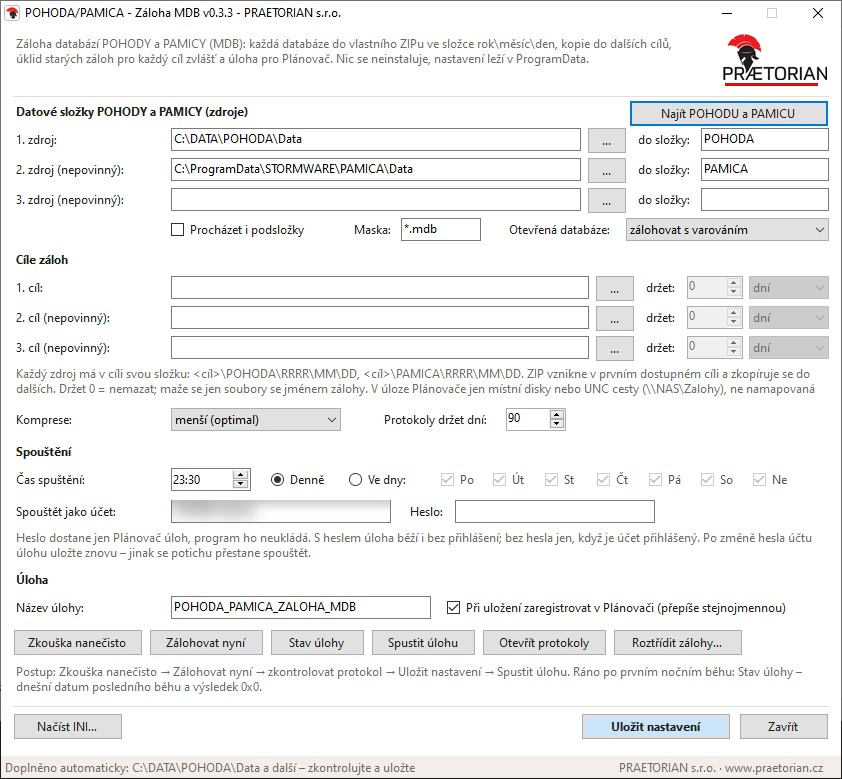
The program's window (the account field is blurred, click to enlarge)
How it behaves
- Finds the data itself: locates the POHODA and PAMICA data folders from the installation settings (
PhDir.ini) and default locations. A share on the server itself is translated to a local path, so the backup does not go over the network. - POHODA and PAMICA kept apart: each source has its own folder in the destination; identically named databases of both programs never collide.
- Open databases: a .ldb lock file next to an MDB means the database is open. Depending on settings it is backed up with a warning, or skipped. Schedule backups outside working hours.
- No broken ZIPs: the archive is written under a temporary name and renamed only after it has been verified to open and its size checked out.
- Multiple destinations: the backup is created in the first available destination and copied to the others. An unavailable destination (a sleeping NAS) is logged as an error and the run continues.
- Per-destination retention: set in days, weeks, months or years for each destination — e.g. local disk one month, NAS three years. Only files named as backups are deleted.
- Checks the task is running: the Task status button shows the last and next run and warns when the task has stopped running — typically after an account password change, which Windows does not report.
- One run at a time: a new run exits immediately while the previous one is still running.
Deployment
- No installation — a single program; settings live in
C:\ProgramData, so a new version is simply copied over the old one. - In the window: Dry run → Back up now → Save settings (creates the scheduled task) → Run task → Task status.
- The task runs under an account that can read the data folders and write to the destinations. The password goes only to Task Scheduler; the program never stores it. Use UNC paths for a NAS (
\\NAS\Backups), not mapped drive letters. - Includes Sort backups — files older backups into year\month folders by the date in their name.
Sample run log
PRAETORIAN s.r.o. - www.praetorian.cz
Vytvořeno: POHODA/PAMICA - Záloha MDB v0.3.5, 2026-11-05 23:30:02
Počítač: SERVER   Účet: DOMENA\Zalohy   INI: C:\ProgramData\POHODA-Zaloha\pohoda-zaloha-mdb.ini

23:30:02  INFO   Zdroj: C:\DATA\POHODA\Data   -> <cíl>\POHODA\RRRR\MM\DD
23:30:02  INFO   Zdroj: C:\ProgramData\STORMWARE\PAMICA\Data   -> <cíl>\PAMICA\RRRR\MM\DD
23:30:02  INFO   Cíl:   D:\ZALOHY   retence: 1 měsíc (mazat starší než 5. 10. 2026)
23:30:02  INFO   Cíl:   E:\ZALOHY   retence: 3 měsíce (mazat starší než 5. 8. 2026)
23:30:02  INFO   Cíl:   \\NAS\Zalohy   retence: 3 roky (mazat starší než 5. 11. 2023)
23:30:02  INFO   Maska: *.mdb  Podsložky: ne  Otevřené DB: zalohovat
23:30:02  CHYBA  Cíl není dostupný (neexistuje nebo chybí přístup): \\NAS\Zalohy
23:30:02  INFO   Ve zdroji C:\DATA\POHODA\Data nalezeno 3 souborů
23:30:02  INFO   Ve zdroji C:\ProgramData\STORMWARE\PAMICA\Data nalezeno 1 souborů
23:30:09  OK     [1/4] 12345678_2025.mdb  (182.4 MB -> 31.7 MB)
23:30:21  OK     [2/4] 12345678_2026.mdb  (214.9 MB -> 36.2 MB)
23:30:21  POZOR  Databáze je otevřená, záloha nemusí být konzistentní: C:\DATA\POHODA\Data\87654321_2026.mdb
23:30:30  OK     [3/4] 87654321_2026.mdb  (96.3 MB -> 17.9 MB)
23:30:35  OK     [4/4] 12345678_2026.mdb  (54.0 MB -> 9.8 MB)
23:30:36  INFO   Úklid v D:\ZALOHY: smazáno 4 záloh starších než 5. 10. 2026
23:30:36  INFO   Úklid v E:\ZALOHY: smazáno 0 záloh starších než 5. 8. 2026
23:30:36  INFO
23:30:36  CHYBA  Zálohováno: 4 z 4, přeskočeno: 0, varování: 1, chyby: 1
23:30:36  INFO   Objem: 548 MB -> 96 MB v ZIPu, trvání 00:00:34
23:30:36  CHYBA  Hotovo s chybami.
Sample data, no client information. The log itself stays in Czech — it is what the program writes. An unavailable destination is an error — the run exits with a non-zero return code even when the other destinations complete fine.
- Version
- 0.3.5
- System
- Windows 10/11, Windows Server 2016 and newer
- Installation
- none (.NET Framework ships with Windows)